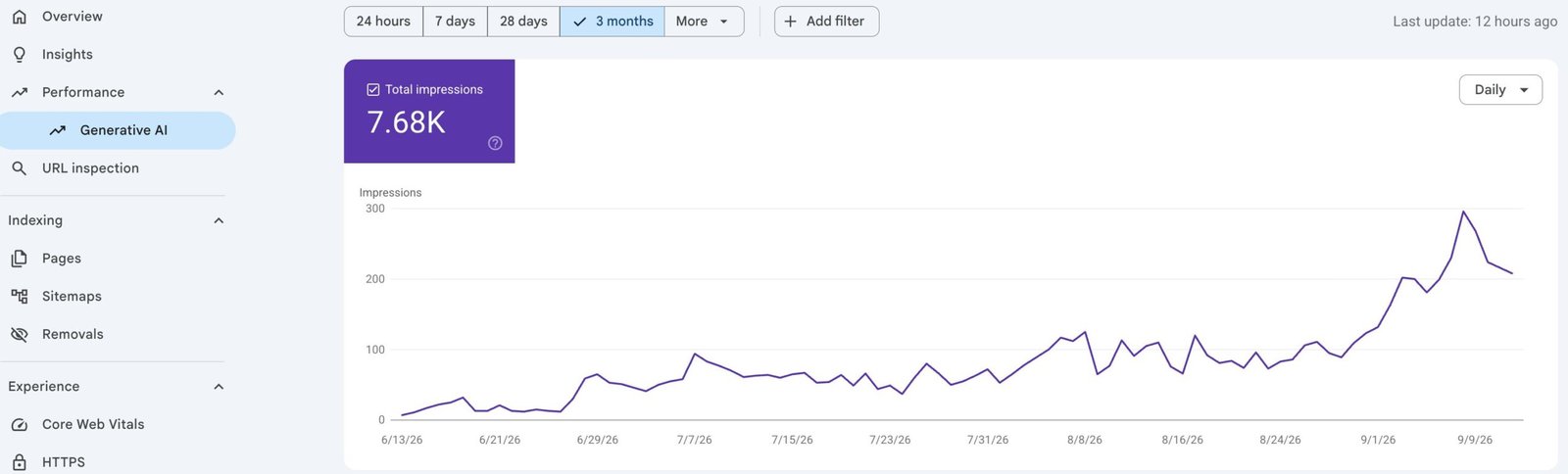
Google Search Console finally has a dedicated view for generative search. Google announced the report on June 3, 2026, and says the worldwide rollout was completed on August 31, 2026.
The report answers a useful question: which parts of your website are appearing as links in Google’s AI Overviews and AI Mode?
It doesn’t answer every question an SEO team will have. Google currently documents impressions, pages, countries, dates, and devices in the dedicated report. It doesn’t document clicks, click-through rate, average position, search queries, or a separate AI Overview versus AI Mode filter.
Short answer: use the Search Console generative AI report to measure visibility, then combine it with the regular Web performance report and Google Analytics to evaluate traffic and conversions. Don’t treat an AI impression as a visit.
What is the Search Console generative AI report?
The generative AI performance report is a Search Console view dedicated to organic impressions from generative features in Google Search. Its current coverage includes:
AI Overviews;
AI Mode.
Google also has a separate generative AI performance report for Discover. This guide focuses on the Search report.
The change matters because AI visibility was previously mixed into the standard Search performance data. Google still includes these impressions in the main Performance report under the Web search type, but the dedicated view now lets you isolate generative AI impressions.
That’s a meaningful improvement. You can identify pages that Google already uses as supporting links in generative results without relying entirely on manual searches or third-party tracking tools.
Google’s official launch announcement says the report was introduced on June 3, 2026. An update to that announcement states that the insights had rolled out to all websites worldwide by August 31, 2026.
What the report shows
Field
What it tells you
How to use it
Total impressions
How often links to your site were presented in supported generative AI features
Track whether overall AI visibility is rising, falling, or staying flat
Pages
Which canonical URLs received generative AI impressions
Find content that already earns visibility and deserves careful expansion
Countries
Where the searches that generated those impressions occurred
Compare visibility across target markets and language versions
Devices
Whether searches occurred on desktop, mobile, or tablet
Check whether visibility is concentrated on one device category
Dates
How impressions changed by day, week, or month
Compare periods and annotate content, technical, or product changes
Google defines an impression in this report as an instance in which a link to your site is presented to a user in a generative AI feature. This definition is narrower than a vague “brand appearance.” The report measures a displayed link associated with your property.
Page data follows canonical URLs
The Pages dimension uses the final linked URL after redirects. As with the regular Performance report, most data is assigned to the canonical URL rather than a duplicate URL.
This matters on multilingual sites and sites with parameterized URLs. If the page you expected isn’t listed, check its canonical tag and Google-selected canonical before assuming the content received no visibility.
The chart and table can show different totals
The main chart aggregates data at the property level. If two results from the same site appear in one generative result, Google records one property-level impression in the chart. When you apply a URL filter, the chart switches to URL-level aggregation.
The table changes its aggregation according to the selected dimension. Page rows are aggregated by page, while country, device, and date rows are aggregated by property. This is why adding every page row may not reproduce the number shown above the chart.
Recent data can be preliminary
A dotted line marks preliminary data that Google is still collecting. Those values can change over the next several hours. Use completed periods for reporting to clients or management.
Search Labs experiments are excluded
Google says Search Console doesn’t include data from experiments in Search Labs because those experiments are still in development. A page can therefore appear during an experimental search experience without producing a corresponding row in this report.
You can export the data
The report includes an export button for its chart and table. One small detail is easy to miss: values displayed as ~ or - in the interface become zero in the downloaded data. Record that rule in any dashboard or spreadsheet that consumes the export.
The current report also inherits ordinary Search performance limits, including the 1,000-row interface limit. Google documents these details in its generative AI performance report guide.
What the report does not show
The new report is useful, but it’s a visibility report rather than a complete acquisition report.
Google currently documents one metric in the dedicated Search report: impressions. The available dimensions are pages, countries, dates, and devices. The current help page doesn’t list the following:
clicks from AI Overviews or AI Mode;
click-through rate;
average position;
the search queries that triggered an impression;
a dimension that separates AI Overviews from AI Mode;
the exact passage Google used to support an answer;
whether Google described your brand positively or negatively.
The regular Search Console Performance report still includes clicks, impressions, queries, and positions from the Web search type. But because Google combines generative and conventional Web search activity there, you can’t use the regular report to isolate AI Overview clicks precisely.
Google Analytics can show what visitors did after arriving on your site. It doesn’t reliably label a Google organic visit as “AI Overview” or “AI Mode.” Use Analytics for engagement and conversions, while recognizing that source attribution and AI visibility are different measurements.
How to use the Search Console generative AI report
1. Select the correct Search Console property
Sign in to Google Search Console and choose the property you want to analyze. A domain property is useful for a complete view across protocols and subdomains. A URL-prefix property can help when you need to examine a specific section, such as an English or German directory.
Open the dedicated generative AI performance report. Google also provides a direct “Open report” link in its official help page.
2. Check the Search generative AI setting
Google introduced a separate participation control alongside the report. You’ll find it under Settings > Search generative AI.
The default choice includes your site’s links and content in supported generative AI features. If you exclude the property, Google says its content and links won’t appear in AI Overviews, AI Mode, or supported generative features in Discover. The property won’t receive impressions or traffic from those features.
Child properties can inherit the choice from a parent property. Check both levels if a language folder or subdomain behaves differently from the main domain.
This setting is separate from Google-Extended, which controls certain uses related to AI model training. It also doesn’t change eligibility in the rest of Google Search. The distinction is explained in Google’s Search generative AI control documentation.
3. Establish a stable comparison period
Start with a completed 28-day period and compare it with the previous 28 days. A longer window reduces the noise created by product changes, demand shifts, and daily variation.
Keep the reporting timezone in mind. Search Console uses Pacific Time for dates in this report, even when your team or customers are in Europe.
4. Find the pages earning AI visibility
Open the Pages tab and sort by impressions. Group the URLs by page type:
informational guides;
comparisons and list pages;
product or service pages;
category and hub pages;
news and time-sensitive articles.
This grouping gives you a more useful answer than simply naming the top URL. If most impressions go to explanatory articles, Google may be using your site primarily as a supporting source. If commercial pages also appear, inspect the questions those pages answer and the evidence they contain.
5. Compare markets and devices
Use the Countries dimension to check whether visibility matches your intended audience. A German business may find that an English article earns impressions in the United States while its German counterpart remains unseen in Germany. That result points to a localization or content-depth question, not necessarily a technical fault.
Then check Devices. Device data won’t explain why Google selected a page, but it helps you see where the exposure occurs and whether your visible pages work well on those screens.
6. Export and annotate the result
Export the chart and table at a consistent interval. Add notes for publication dates, substantial content revisions, migrations, canonical changes, and Google-reported data incidents.
For example, Google reported a logging error that reduced generative AI impressions for August 13–17, 2026. The company said the missing data was restored on August 21. If an old export still shows that dip, compare it with the corrected interface before drawing a conclusion. Google records reporting issues on its Search Console data anomalies page.
How to interpret generative AI impressions
An impression confirms that Google presented a link to your site in a supported generative result. It doesn’t confirm that the user clicked, read the page, remembered the brand, or converted.
That limitation changes how you should read the number.
Pattern
Reasonable interpretation
Next check
Impressions rise across many relevant pages
Google is presenting more of the site’s URLs in generative results
Compare countries, page types, regular Web clicks, and conversions
One page receives most impressions
The site may depend on one strong source page or one topic
Build supporting content and internal links without weakening the winning page
Impressions rise but organic sessions stay flat
Exposure may not be producing clicks, or other organic traffic may have changed
Review landing-page sessions, overall Web clicks, conversions, and period differences
No generative AI impressions appear
The site may lack sufficient exposure, be excluded, or not have reportable data
Check the participation control, indexing, snippet eligibility, and selected property
Chart and page totals differ
Property-level and page-level aggregation are producing different totals
Keep the same dimension and aggregation when comparing periods
A rise in impressions is a visibility signal. Treat it as the start of an investigation, not the final performance verdict.
A practical AI search measurement workflow
No single report covers discovery, visits, and business results. A workable measurement setup combines three layers.
Layer 1: Generative visibility
Use the dedicated Search Console report for:
total generative AI impressions;
visible pages;
country distribution;
device distribution;
change over time.
Layer 2: Search demand and organic traffic
Use the regular Search Console Web report for queries, total clicks, total impressions, click-through rate, and position. The data includes both conventional and generative Search activity, so label it as combined Web performance.
Layer 3: On-site behavior and outcomes
Use Google Analytics or another analytics platform for landing pages, engaged sessions, key events, leads, and revenue where configured. This tells you what happened on the site. It won’t reconstruct an AI Overview impression that produced no visit.
A simple monthly dashboard can use the following fields:
Metric
Source
Reporting note
Generative AI impressions
Search Console generative AI report
Use completed periods and keep the aggregation consistent
Number of visible pages
Pages export
Separate new pages from pages that lost visibility
Web clicks and queries
Regular Search performance report
These aren’t isolated to generative AI
Organic landing-page sessions
Analytics
Compare the same pages found in the AI report
Leads or key events
Analytics or CRM
Report only events that are correctly configured and tested
Content and technical changes
Change log
Record dates without claiming causation from correlation alone
This setup won’t answer every attribution question. It will keep three different ideas—visibility, traffic, and outcomes—from collapsing into one misleading number.
What “Google Search Console KI Bericht” and “AI Overviews messen” refer to
English-language teams will usually search for Search Console generative AI report. German-speaking teams often use phrases such as Google Search Console KI Bericht or AI Overviews messen.
Google’s current German interface and help documentation use these labels:
Leistungsbericht zu generativen KI-Funktionen (Google Suche) for the generative AI performance report;
Übersichten mit KI for AI Overviews;
KI-Modus for AI Mode;
Impressionen for impressions;
Seiten, Länder, Zeiträume und Geräte for the available dimensions.
The German report measures the same data. It doesn’t become a different dataset when the Search Console interface language changes. Google’s German help page is the best reference for the current UI terminology.
Common mistakes when reporting AI Overviews and AI Mode
Calling every impression a citation
The report counts links presented in supported generative features. It doesn’t show the exact answer text or the role your page played in producing it. “Generative AI impression” is the accurate label for the metric.
Reporting impressions as visits
A user can see a link without opening it. Keep impression, session, and conversion metrics in separate columns.
Adding page rows to reproduce the chart
The chart and Pages table use different aggregation rules. A discrepancy isn’t automatically missing data.
Using preliminary values in a final report
The dotted end of the graph can change. Wait for the period to complete before recording a final total.
Assuming a missing report proves a penalty
Google lists insufficient generative AI impressions and an exclusion setting among the possible reasons a property may not show data. Also confirm that you selected the correct property.
Trying to solve visibility with special AI markup
Google says there are no additional technical requirements for appearing in AI Overviews or AI Mode. A page must be indexed and eligible to appear in Search with a snippet. Google also says you don’t need a new AI text file, special machine-readable file, or dedicated schema.org markup for these features.
The fundamentals still matter: crawl access, internal links, page experience, visible text, useful images or video where appropriate, and structured data that matches the page. See Google’s AI features and your website documentation.
What to improve after reading the data
Start with pages that already receive relevant generative AI impressions. Google has shown that these URLs are eligible to appear. Your job is to preserve what makes them useful while improving the surrounding experience.
Check whether the page answers one clear question near the beginning.
Use headings that describe the actual subtopics rather than variations of the same keyword.
Keep definitions, evidence, dates, and limitations in visible HTML text.
Link claims to primary sources close to the relevant statement.
Add internal links from the appropriate topic hub and related guides.
Update stale screenshots, product labels, and policy information.
Make the next action clear for a reader who does click.
For pages with no impressions, check eligibility before rewriting the copy. Confirm that Google can crawl the page, the URL is indexed, the canonical is correct, snippets are allowed, and important content is available as text. Optis Digital’s technical SEO checklist covers the broader checks, while the AI Overviews guide for DACH explains the content and market context.
Avoid changing ten things at once. Record the page, date, reason, and exact revision. Then compare complete periods. Search Console shows correlation around a change; it doesn’t prove that the change caused the result.
Frequently asked questions
Is the Search Console generative AI report available worldwide?
Yes. Google states that the insights were rolled out to all websites worldwide on August 31, 2026. A property can still show no reportable data if it hasn’t received enough generative AI impressions or if its content is excluded from those features.
Does the report include both AI Overviews and AI Mode?
Yes. Google currently lists AI Overviews and AI Mode as the Search features covered by the report. Search Labs experiments aren’t included.
Can I separate AI Overview data from AI Mode data?
Google’s current report documentation doesn’t list a feature-type dimension that separates the two. The dedicated view reports impressions from both supported experiences together.
Can I see the queries that triggered AI impressions?
The current generative AI report documentation lists pages, countries, dates, and devices as dimensions. It doesn’t list queries. Query data remains available in the regular Web performance report, where generative and conventional Search activity are combined.
Does the report show clicks from AI Overviews?
The dedicated report currently documents impressions, not a separate clicks metric. Use the regular Search performance report and analytics to study traffic, while recognizing that those tools don’t provide a clean AI Overview click segment.
Why are the chart and table totals different?
The chart normally aggregates at the property level, while the Pages table aggregates by page. If two pages from one site appear in the same generative result, the property-level chart can record one impression while page-level rows reflect each page according to their own aggregation.
Do I need special schema markup to appear in AI Overviews?
No. Google says no special schema.org markup is required. The page must be indexed, eligible for a Search snippet, accessible to Google, and compliant with the usual Search requirements. Existing structured data should match the visible page.
Use the report as a baseline, not a scoreboard
The new Search Console generative AI report gives website owners something they didn’t have before: a direct view of which pages receive impressions in AI Overviews and AI Mode.
Its limits are just as important. It doesn’t tell you the triggering query, provide isolated AI clicks, or explain why Google selected a page. A responsible report says exactly what the metric represents.
Export the first complete period. Check the participation control. Identify the pages already earning relevant impressions. Then connect that visibility data with regular Search Console performance, analytics, and a dated change log.
With years of experience navigating the ever-evolving crypto landscape, Eugen knows exactly how to make content shine in Google’s eyes—without breaking the algorithm. With experience working as an SEO specialist in real fast-growing crypto companies, along with training in crypto trading, Google Ads Search Certification, and Google Analytics Individual Qualification, he is a master of SEO in the crypto world, blending AI-powered strategies with deep industry knowledge. From ChatGPT to blockchain trends, he knows how to make content rank, engage, and convert.