How to Track AI Referral Traffic in GA4: 2026 Guide
How to Track AI Referral Traffic in GA4: 2026 Guide
Last updated: September 29, 2026
To track AI referral traffic in GA4, create a custom channel for AI assistants based on the Session source dimension, then group recognizable sources such as ChatGPT, Perplexity, Claude, Gemini, and Microsoft Copilot.
But there is one important limitation.
GA4 can measure a visit when an AI platform sends identifiable referral or campaign information. It can’t tell you every time an AI system mentions, recommends, or cites your website. Google AI Overviews and AI Mode also need separate treatment because their traffic is part of Google Search.
A useful measurement setup therefore connects three different datasets:
GA4 for AI referral sessions, engagement, landing pages, and conversions.
Google Search Console for visibility in Google AI Overviews and AI Mode.
Bing Webmaster Tools for citations across Microsoft Copilot and other supported Microsoft AI experiences.
This guide shows how to configure that setup without mixing AI referrals with normal organic search.
What counts as AI referral traffic?
AI referral traffic is a session that starts after someone clicks a link to your website inside an AI assistant or AI-powered answer.
For example, a user might ask ChatGPT for B2B SEO agencies in Germany, click a cited website, and start a session on that site. If the referral information survives the click, GA4 can associate the session with ChatGPT.
The same principle applies to clicks from tools such as Perplexity, Claude, Gemini, and Copilot.
That is different from an AI mention or AI citation.
An assistant can mention your brand 1,000 times without sending a single visitor. Conversely, a small number of citations can produce highly qualified referral sessions.
So don’t use GA4 sessions as a proxy for total AI visibility.
What you want to measure
Best starting point
AI referral visits
GA4
Engaged AI sessions
GA4
AI-generated leads
GA4 + CRM
ChatGPT referral clicks
GA4
Google AI Overviews / AI Mode visibility
Google Search Console
Microsoft Copilot citations
Bing Webmaster Tools
Brand mentions without a click
AI visibility monitoring / manual prompt tracking
Start with Session source, not First user source
GA4 has several traffic-source dimensions, and choosing the wrong one can make AI traffic analysis confusing.
For this report, start with Session source or Session source / medium.
Session-scoped dimensions tell you what generated a particular session. That matters because someone may originally discover your company through Google, return through LinkedIn, and later click a recommendation in ChatGPT.
If you only look at First user source, that ChatGPT visit can be hidden behind the source that originally acquired the user.
For AI referral reporting, the question is usually:
Which AI platform started this visit?
That is a session-level question.
How to find AI traffic in GA4 before creating anything
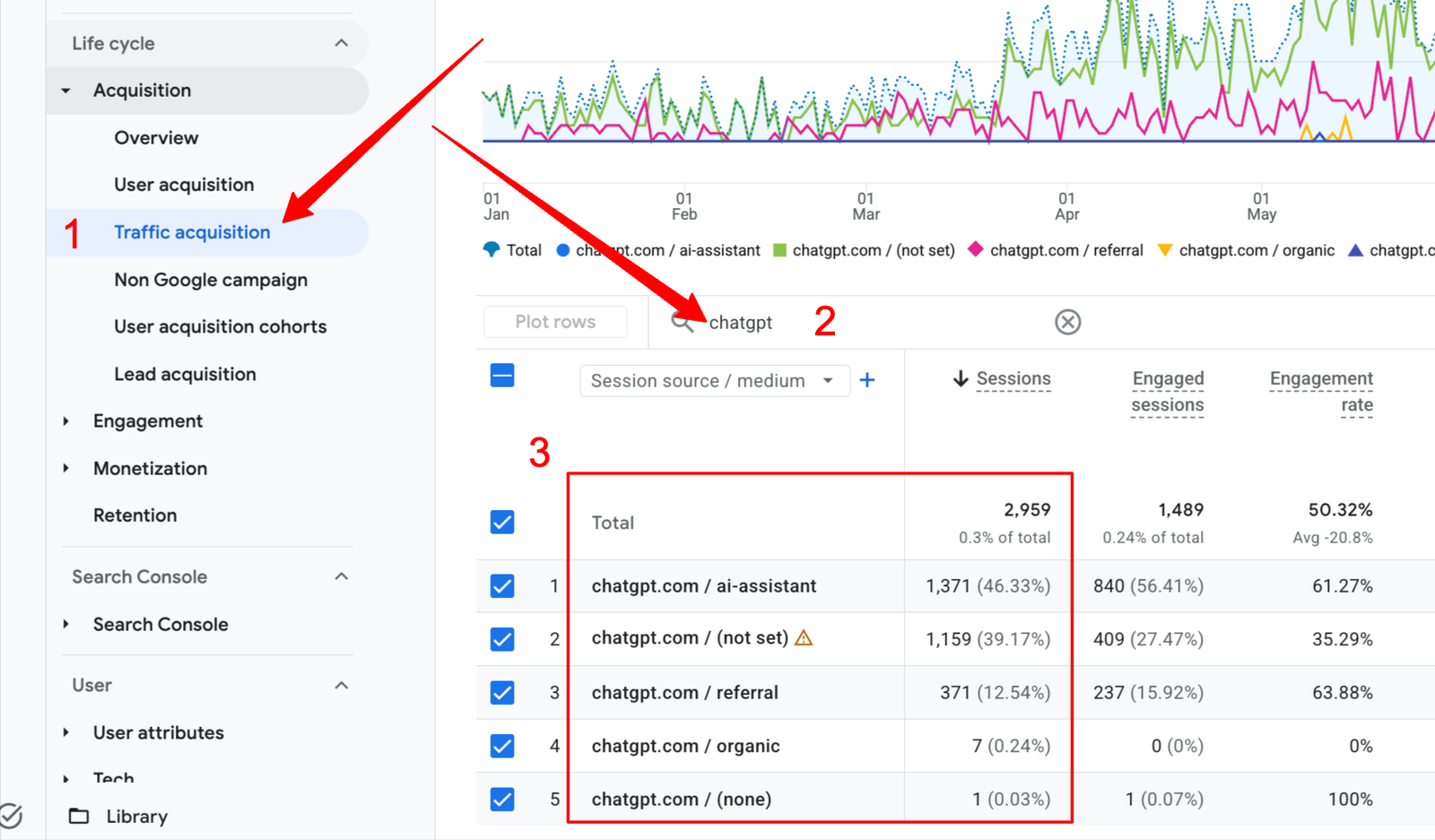
Before building a custom channel, check what your property is already collecting.
Open Reports.
Go to Acquisition → Traffic acquisition.
Change the primary dimension to Session source / medium or Session source.
Search for terms such as chatgpt, perplexity, claude, gemini, and copilot.
Increase the date range if your AI traffic volume is still small.
This first check is useful because referral identifiers can change. Your own GA4 property is the best place to confirm which source values are reaching your site.
Create an AI Assistants custom channel group in GA4
Google Analytics now explicitly documents AI assistants as a use case for custom channel groups.
That makes this much easier than maintaining separate filters every time you want to analyze AI traffic.
You need Editor-level access to the GA4 property to create or edit channel groups.
Open Admin.
Under Data display, select Channel groups.
Choose Create new channel group.
Start from a copy of the default channel group.
Add a new channel called AI Assistants.
Use Source as the condition.
Select matches regex.
Add your AI source regex.
Move AI Assistants above the normal Referral channel.
Save the group.
The order matters because GA4 assigns traffic to the first matching channel in the group.
A practical AI referral regex for GA4
Google provides its own broad AI-assistant regex in the Analytics documentation. For production reporting, a narrower rule is often easier to audit because it reduces the chance of unrelated domains matching a generic term.
A reasonable starting pattern for the major platforms is:
Check the actual Session source values in your property and expand the expression when a new AI platform starts sending measurable traffic.
You may eventually decide to include additional assistants separately rather than putting everything into one giant regex.
Why not add google or bing to the regex?
Because that would create a much bigger attribution problem.
If you add a generic source such as google, your AI channel can start capturing ordinary Google organic search sessions.
The same problem applies to Bing.
Keep normal search traffic out of the AI-referral regex unless you have a source value that specifically identifies the AI experience.
ChatGPT is currently one of the easier AI sources to identify
OpenAI documents an important attribution detail for publishers: referral URLs from ChatGPT Search automatically include utm_source=chatgpt.com.
That gives publishers a clearer identifier for inbound ChatGPT traffic than relying only on a browser referrer.
So when checking ChatGPT traffic, don’t filter only for:
medium = referral
Check the source itself.
A useful GA4 filter is:
Session source contains chatgpt
You can then add:
Sessions
Users
Engaged sessions
Engagement rate
Key events
Landing page
This tells you considerably more than the number of visits.
A page receiving 20 ChatGPT sessions and three qualified enquiries may be more commercially important than a page receiving 500 ordinary referral visits.
Build an AI referral report that is useful for SEO and GEO
Counting AI sessions is the easy part.
The more useful question is what those visitors do after they arrive.
Create an Exploration or custom report with the following structure.
Dimension or metric
Why it matters
Session source
Identifies the AI platform
Session source / medium
Helps diagnose attribution differences
Landing page
Shows which pages AI systems send users to
Sessions
Measures visit volume
Engaged sessions
Filters out some low-engagement visits
Engagement rate
Lets you compare AI traffic with other channels
Key events
Connects AI visits with business actions
Session key event rate
Helps compare conversion behavior
For a B2B website, key events might include:
contact form submissions;
demo requests;
consultation bookings;
qualified lead forms;
important PDF or research downloads;
other actions that genuinely represent commercial intent.
A scroll event or ten-second visit may be useful for behavioral analysis, but it isn’t the same thing as a lead.
Track landing pages, not just AI platforms
One of the most useful dimensions in an AI referral report is Landing page.
It answers a practical content question:
Which pages are AI systems actually sending people to?
You may discover that AI referrals behave differently from Google organic traffic.
A service page might rank well in Google, while an original study, comparison, statistics page, or technical guide generates most of the ChatGPT and Perplexity referrals.
Once you see that pattern, you can investigate why.
Google AI Overviews and AI Mode need a different setup
Do not create a GA4 rule that labels all google / organic sessions as AI traffic.
Google AI Overviews and AI Mode are integrated into Google Search. A visit can therefore arrive through Google organic search without GA4 giving you a reliable way to determine whether the user clicked a traditional search result, AI Overview, or AI Mode result.
Google Search Console now provides a dedicated Generative AI performance report.
As of August 31, 2026, Google says these insights have been rolled out to websites worldwide, although properties still need enough qualifying data for the report to appear.
The report currently focuses on impressions from:
AI Overviews;
AI Mode.
You can break those impressions down by page, country, date, and device.
Google also states that activity from AI features remains part of the normal Search Console Web performance data. Clicks from external links in AI Overviews and AI Mode count as Search clicks there.
This creates an important measurement distinction:
Question
Where to look
Was my page shown in Google generative AI features?
Search Console Generative AI performance report
How much Google organic traffic reached the page?
GA4 + standard Search Console performance
Can GA4 reliably split AI Overview clicks from normal Google clicks?
No, not from the standard Google organic source alone
Keep that distinction in your reporting instead of manufacturing an “AI traffic” number that GA4 can’t support.
Measure Microsoft Copilot citations separately
Microsoft provides another useful dataset through Bing Webmaster Tools.
Its AI Performance reporting shows how publisher content appears in AI-generated answers across Microsoft Copilot, Bing AI experiences, and supported partner experiences.
That report is useful for questions GA4 can’t answer:
Is the site being cited?
Which URLs receive citations?
How is citation visibility changing?
Which topics or intents produce visibility?
If a Copilot user then clicks through and the source is identifiable, GA4 can measure the resulting visit.
Use both datasets.
Bing Webmaster Tools measures visibility and citations. GA4 measures onsite behavior after a visit begins.
Why AI traffic can be undercounted in GA4
Your AI referral report will not represent every visitor influenced by an AI system.
There are several reasons.
1. The user never clicks
An AI assistant may answer the question using your content, mention your brand, or cite a page without producing a visit.
GA4 sees nothing because no session occurred.
2. Referral information can disappear
Browser behavior, application environments, redirects, privacy controls, and link handling can affect the attribution information reaching the destination website.
Some visits may therefore appear under a different source or as direct traffic.
3. Users continue the journey somewhere else
A person may discover a company in ChatGPT, remember the brand name, and search Google ten minutes later.
GA4 will usually see the Google session.
It won’t automatically know that ChatGPT influenced the decision.
4. Citations and traffic measure different behaviors
A citation answers, “Was this page used or surfaced as a source?”
A referral session answers, “Did someone click through?”
Those metrics should sit next to each other, not replace each other.
Don’t relabel Direct traffic as AI traffic
A common temptation is to see a rise in Direct traffic after AI visibility increases and attribute the difference to ChatGPT or another assistant.
That is not reliable evidence.
Direct traffic is essentially a bucket for sessions where GA4 doesn’t have usable referral or campaign information.
Some AI-influenced visits may end up there.
So can many unrelated visits.
Use Direct traffic as a signal worth investigating, not as measured AI referral traffic.
Create an AI traffic dashboard
A useful dashboard doesn’t need 30 charts.
Start with four views.
AI referral trend
Show AI-assistant sessions by week or month.
Break the trend down by platform when volume is high enough to make that comparison useful.
Top AI landing pages
For every landing page, show:
AI sessions;
engaged sessions;
engagement rate;
key events;
key event rate.
AI platforms
Compare ChatGPT, Perplexity, Claude, Gemini, Copilot, and any additional verified sources that appear in your property.
Business outcomes
Show the actions that matter to the business:
qualified leads;
consultation requests;
demo bookings;
revenue, where relevant;
assisted conversions or influenced pipeline when your CRM setup supports them.
This prevents AI reporting from becoming another visibility dashboard that nobody can connect to revenue.
A simple monthly AI measurement framework
For a B2B website, combine the data into three layers.
Layer
Example metrics
AI visibility
Mentions, citations, Google AI impressions, cited URLs
That gives you a much better picture than reporting “ChatGPT traffic increased 40%.”
For example, suppose one month shows:
more Google AI Overview impressions;
more Copilot citations;
five additional pages receiving ChatGPT referral sessions;
two consultation requests from AI referrals.
Those are different signals, but together they describe the journey from AI visibility to measurable business activity.
How often should you update the AI source regex?
Review the source list at least once a month if AI traffic matters to your acquisition strategy.
Also check it after major changes to AI products.
The goal isn’t to build the longest possible regex. The goal is to maintain a list of sources you can explain and verify.
A simple review process is:
Open Traffic acquisition.
Export or inspect Session source values.
Search for known AI brands and domains.
Confirm unfamiliar sources before classifying them.
Add verified sources to the custom channel.
Record the date of the change.
Google also recommends updating AI-assistant matching rules as URLs and platforms change.
Common GA4 AI tracking mistakes
Using only medium = referral
This can miss traffic where campaign parameters affect attribution. ChatGPT is a good example because OpenAI documents its use of utm_source=chatgpt.com.
Build the core rule around the source.
Putting google in the AI regex
This contaminates AI reporting with standard organic search.
Use Search Console for Google AI visibility instead.
Treating every AI mention as traffic
A mention is not a session.
Measure visibility and visits separately.
Reporting sessions without landing pages
You lose one of the best signals for understanding which content AI systems are sending users to.
Reporting traffic without key events
Traffic volume alone doesn’t tell a B2B team whether AI discovery contributes to pipeline.
Assuming missing attribution means zero AI influence
GA4 observes identifiable visits. It does not observe every research step a buyer completed before visiting the site.
The GA4 AI referral setup checklist
Check existing AI sources in Traffic acquisition.
Use Session source for session-level AI reporting.
Create a custom AI Assistants channel group.
Place the channel above Referral.
Use a narrow, auditable regex.
Track ChatGPT source values rather than relying only on referral medium.
Include landing pages and engagement metrics.
Configure meaningful B2B key events.
Keep Google AI Overviews and AI Mode out of the generic referral regex.
Use Search Console’s Generative AI report for Google AI visibility.
Use Bing Webmaster Tools AI Performance for Microsoft AI citations.
Review source values and regex rules regularly.
Connect AI traffic to leads and pipeline where possible.
What a good AI measurement setup actually tells you
The purpose of tracking AI traffic isn’t to produce a new number for a marketing report.
It should help answer better questions.
Which pages are cited by AI systems?
Which of those citations result in visits?
Which landing pages attract engaged visitors?
Which AI sources generate qualified leads?
And which content formats appear to contribute to both visibility and business outcomes?
GA4 answers only part of that.
Combine referral data with Search Console, Bing Webmaster Tools, citation monitoring, and lead data, and you can start measuring the full path from AI visibility to business impact.
With years of experience navigating the ever-evolving crypto landscape, Eugen knows exactly how to make content shine in Google’s eyes—without breaking the algorithm. With experience working as an SEO specialist in real fast-growing crypto companies, along with training in crypto trading, Google Ads Search Certification, and Google Analytics Individual Qualification, he is a master of SEO in the crypto world, blending AI-powered strategies with deep industry knowledge. From ChatGPT to blockchain trends, he knows how to make content rank, engage, and convert.